

.svg)
The Booking Scam Got Smarter
The Booking Scam Got Smarter.
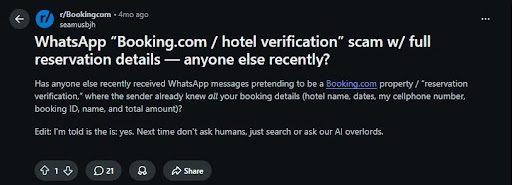
This scam pattern has been around for years. Guests have already been hit with fake payment links, fake verification pages, and messages that appear to come from a real property. The 2026 problem is the quality of the data behind it.
Phishing messages used to be easier to catch. Bad grammar, vague booking details, strange links, and obvious pressure were immediate red flags.
In April 2026, Booking.com began notifying customers that unauthorized third parties had accessed guest reservation data. Malwarebytes reported that the exposed data included booking details, names, email addresses, physical addresses, and phone numbers. Booking.com said financial information was not accessed. But scammers still have enough to make a card re-verification link look real. The guest’s name, stay dates, property details, and contact information is all they need.
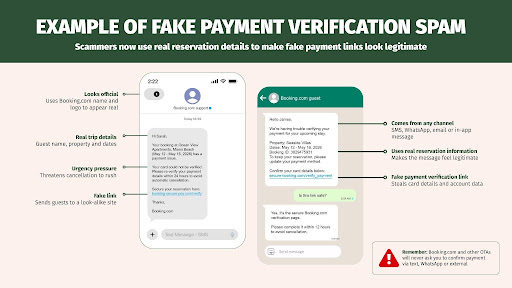
The Scam Looks Like A Real Booking Problem
A guest gets a WhatsApp, SMS, email, or platform message claiming their payment failed. The message says they need to re-verify the card or the reservation will be canceled. Then they see the correct property name, correct travel dates, and enough personal detail to make the warning feel legitimate. The same details that used to make a message feel safe are now what make the scam convincing.
Coverage of recent reservation hijacking scams has warned that these messages can arrive through WhatsApp, SMS, email, or messages that appear connected to Booking.com. Hosts should assume guests may receive highly convincing payment warnings tied to real reservation details.
The damage doesn’t stop when someone loses money. The traveler may blame the property, open a support case, dispute the charge, or report the host account because the scam used stay details attached to your listing.
What To Change This Week
01
Start With Your Host Logins. Turn on multi-factor authentication (MFA) or passkeys for every OTA account, PMS, channel manager, direct booking site, email account, and payment tool tied to guest reservations.
02
Use A Password Manager. Use something like 1Password and give every platform its own unique password. The U.S. government’s cybersecurity agency recommends long, random, unique passwords generated by a password manager with MFA turned on wherever possible. If your Booking.com password also opens your email, PMS, or direct booking site, one compromised login can become a much bigger problem.
03
Add A Payment Safety Statement To Your Direct Booking Site. If you have a direct booking website, consider adding language similar to this:
“We will never ask you to re-verify payment through text, WhatsApp, or an external link. All payments must stay inside the official booking platform or our verified direct booking checkout.”
04
Train Your Team on The Scam Pattern. Attackers often use fake support messages, guest complaint lures, browser-fix prompts, or suspicious attachments to compromise hospitality workers. If someone on your team sees a message asking them to download a file, fix their browser, re-login, or open a strange attachment, they should stop before clicking.
05
Give Guests One Safe Payment Path. Guests should know where payment conversations happen before a scammer reaches them. If they booked through an OTA, tell them all payment issues must stay inside the official platform. If they booked direct, point them to your verified checkout or your official support email. Don’t let payment questions drift into random text threads, WhatsApp messages, or links nobody on your team can verify. Make the safe path obvious before the scam shows up.
Got a Question About Your Setup?
Scam patterns change faster than platform policies can keep up. Inside the Host Camp community, thousands of hosts are comparing notes, pressure-testing systems, and solving real operator problems before they get expensive. Bring your security question, your direct booking setup, or the scam message you’re unsure about.
